
Introduction
In today’s digital world, cybersecurity has become one of the most important concerns for businesses, organizations, and individual users. Every day, millions of systems, websites, applications, and networks are connected to the internet, creating opportunities for cybercriminals to exploit weaknesses. As technology continues to grow, security threats are also becoming more advanced, making it essential for organizations to identify and fix vulnerabilities before attackers can take advantage of them.
One of the most effective methods used by cybersecurity professionals to discover security weaknesses is Vulnerability Scanning.
Vulnerability scanning is a security process that automatically examines computers, networks, applications, servers, and other digital assets to identify known vulnerabilities, misconfigurations, outdated software, and potential security risks. By regularly performing vulnerability scans, organizations can understand their security posture and take preventive actions to protect sensitive information.
A vulnerability scan works like a security health check for digital systems. Just as a doctor examines a person to detect possible health problems before they become serious, vulnerability scanning helps organizations detect security problems before hackers exploit them.
In this comprehensive guide, we will explore everything about vulnerability scanning, including how it works, different types, benefits, tools, processes, challenges, and best practices.
What Is Vulnerability Scanning?
Vulnerability scanning is an automated cybersecurity technique used to identify weaknesses in an organization’s IT environment. It involves using specialized software tools called vulnerability scanners that analyze systems for security flaws.
These scanners compare the information collected from devices and applications against databases containing thousands of known security vulnerabilities. If a match is found, the scanner generates a report explaining the vulnerability, its severity level, possible risks, and recommended solutions.
A vulnerability scanner can identify issues such as:
- Outdated operating systems
- Missing security patches
- Weak passwords
- Incorrect system configurations
- Open network ports
- Unsafe applications
- Database security problems
- Web application vulnerabilities
- Cloud security weaknesses
- Compliance issues
The main purpose of vulnerability scanning is not only to discover problems but also to help organizations reduce their attack surface and improve overall security.
Why Is Vulnerability Scanning Important?
Cyberattacks are increasing rapidly, and attackers constantly search for weak points in networks and systems. Many successful attacks happen because organizations fail to identify vulnerabilities that already exist.
A vulnerability may remain hidden for months or even years until someone discovers and exploits it.
For example, an organization may have:
- An outdated server running old software
- A website with insecure coding
- A database exposed to the internet
- Employees using weak passwords
- Systems missing important security updates
Without proper scanning, these weaknesses may go unnoticed.
Vulnerability scanning helps organizations stay ahead of attackers by finding security problems early.
Protecting Sensitive Information
Modern organizations store large amounts of valuable data, including:
- Customer information
- Financial records
- Employee details
- Business documents
- Intellectual property
A security breach can result in data theft, financial losses, legal problems, and damage to reputation.
Regular vulnerability scanning helps protect sensitive information by identifying risks before they become security incidents.
How Does Vulnerability Scanning Work?
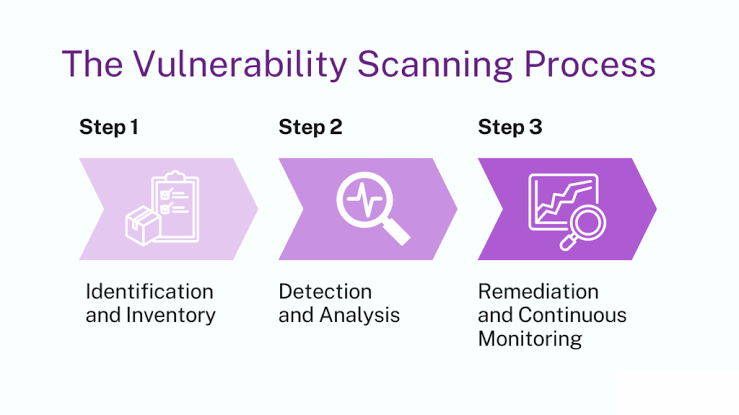
Vulnerability scanning follows a systematic process to analyze digital environments.
1. Asset Discovery
The first step is identifying all devices and systems connected to the network.
A scanner searches for:
- Servers
- Computers
- Routers
- Firewalls
- Applications
- Websites
- Cloud resources
- Network devices
Organizations cannot protect systems they do not know exist, so asset discovery is a critical part of vulnerability management.
2. Information Gathering
After discovering assets, the scanner collects information about each system.
It may identify:
- Operating system versions
- Installed software
- Running services
- Network configurations
- Open ports
- Security settings
This information helps the scanner understand the environment and detect possible weaknesses.
3. Vulnerability Detection
The scanner compares collected information against vulnerability databases.
These databases contain information about known security issues, including:
- Common Vulnerabilities and Exposures (CVEs)
- Security advisories
- Vendor updates
- Exploit information
If the scanner detects a vulnerability, it records details about the issue.
4. Risk Assessment
Not every vulnerability has the same level of danger.
Vulnerabilities are usually classified according to severity:
Critical Severity
Critical vulnerabilities represent serious security risks and may allow attackers to gain complete control over systems.
Examples:
- Remote code execution flaws
- Authentication bypass issues
- Critical software vulnerabilities
High Severity
High-risk vulnerabilities can cause significant damage but may require specific conditions to exploit.
Examples:
- Privilege escalation
- Sensitive data exposure
Medium Severity
Medium vulnerabilities usually have limited impact but should still be addressed.
Low Severity
Low-risk issues may not immediately threaten security but can provide useful information to attackers.
5. Reporting and Remediation
After completing the scan, the vulnerability scanner generates a detailed report.
A typical vulnerability report includes:
- Vulnerability name
- Affected system
- Risk level
- Technical description
- Possible impact
- Recommended fixes
Security teams then prioritize vulnerabilities and apply solutions.
Common fixes include:
- Installing security patches
- Updating software
- Changing configurations
- Removing unnecessary services
- Improving password policies
Types of Vulnerability Scanning
Vulnerability scanning is not limited to one type of technology. Different environments require different scanning methods.
Network Vulnerability Scanning
Network vulnerability scanning focuses on identifying weaknesses within network infrastructure.
It examines:
- Servers
- Routers
- Firewalls
- Switches
- Network services
Network scans help detect:
- Open ports
- Weak configurations
- Unauthorized devices
- Missing patches
- Network vulnerabilities
Businesses commonly use network vulnerability scanning to protect internal and external networks.
Web Application Vulnerability Scanning
Web applications are common targets for cybercriminals because they are publicly accessible.
Web vulnerability scanners analyze websites and applications for security problems such as:
- SQL injection
- Cross-site scripting (XSS)
- Broken authentication
- Insecure configurations
- Data exposure
Companies that operate online platforms often perform regular web application scans to protect customers and business data.
Database Vulnerability Scanning
Databases contain valuable information, making them attractive targets for attackers.
Database vulnerability scanning checks for:
- Weak access controls
- Misconfigurations
- Unauthorized permissions
- Outdated database software
- Security policy issues
Proper database security helps prevent data breaches.
Cloud Vulnerability Scanning
Cloud computing has changed how organizations store and manage data.
Platforms such as cloud servers, storage systems, and applications require specialized security checks.
Cloud vulnerability scanning identifies:
- Incorrect cloud configurations
- Exposed storage
- Weak permissions
- Identity management issues
- Compliance violations
As more businesses move to cloud environments, cloud security scanning has become increasingly important.
Host-Based Vulnerability Scanning
Host-based scanning examines individual computers or servers.
It focuses on:
- Operating system security
- Installed applications
- User permissions
- System settings
This type of scanning provides detailed information about specific devices.
Vulnerability Scanning vs Penetration Testing
Many people confuse vulnerability scanning with penetration testing, but they are different cybersecurity activities.
Vulnerability Scanning
Vulnerability scanning is an automated process that identifies possible security weaknesses.
Characteristics:
- Fast
- Automated
- Regularly performed
- Finds known vulnerabilities
- Produces reports
Penetration Testing
Penetration testing involves ethical hackers attempting to exploit vulnerabilities to determine real-world impact.
Characteristics:
- Manual testing
- More detailed analysis
- Simulates real attacks
- Requires cybersecurity expertise
Both methods are important. Vulnerability scanning helps organizations continuously monitor security, while penetration testing provides deeper testing of security defenses.
Popular Vulnerability Scanning Tools
Vulnerability scanning requires specialized software that can analyze systems, networks, applications, and cloud environments. Different tools provide different features depending on the security requirements of an organization.
Below are some widely used vulnerability scanning solutions.
Tenable Nessus
Nessus is one of the most recognized vulnerability scanning tools in the cybersecurity industry. It is widely used by security professionals to identify vulnerabilities in networks, servers, and applications.
Nessus can detect:
- Missing security patches
- Software vulnerabilities
- Configuration problems
- Compliance issues
- Malware risks
- Weak encryption settings
Organizations use Nessus because it provides detailed vulnerability reports and helps security teams prioritize the most dangerous issues.
Qualys Vulnerability Management
Qualys provides cloud-based security solutions that help organizations monitor vulnerabilities across their entire IT infrastructure.
Its vulnerability management platform can scan:
- Networks
- Endpoints
- Cloud environments
- Web applications
- Containers
One advantage of cloud-based scanning is that organizations can manage security monitoring from a centralized dashboard.
Rapid7 InsightVM
Rapid7 InsightVM is a vulnerability management platform designed to help organizations understand security risks and take corrective actions.
Features include:
- Automated vulnerability discovery
- Risk prioritization
- Security analytics
- Asset tracking
- Integration with other security systems
It helps security teams focus on vulnerabilities that create the greatest business risk.
OpenVAS
OpenVAS is an open-source vulnerability scanning solution used by security researchers and organizations.
It provides:
- Vulnerability detection
- Security testing
- Network scanning
- Detailed reports
Because it is open source, it is popular among cybersecurity students, researchers, and smaller organizations.
PortSwigger Burp Suite
Burp Suite is commonly used for web application security testing.
Security professionals use it to identify:
- Website vulnerabilities
- Authentication problems
- Input validation issues
- Application security weaknesses
It is especially popular among penetration testers and application security teams.
Benefits of Vulnerability Scanning
Regular vulnerability scanning provides many advantages for organizations of all sizes.
1. Early Detection of Security Problems
One of the biggest benefits of vulnerability scanning is finding weaknesses before attackers discover them.
Cybercriminals often search for systems with:
- Old software versions
- Missing updates
- Poor security settings
- Weak authentication
Regular scanning allows organizations to fix these problems before they become security incidents.
2. Reduces Cybersecurity Risks
Every connected device creates a possible entry point for attackers.
Vulnerability scanning reduces risk by identifying:
- Unsafe configurations
- Exposed services
- Vulnerable applications
- Security weaknesses
By fixing these problems, organizations can reduce their overall attack surface.
3. Improves Compliance Requirements
Many industries must follow cybersecurity regulations and security standards.
Examples include:
- Healthcare organizations
- Financial institutions
- Government agencies
- Online businesses
Regular vulnerability scanning helps organizations meet security requirements by providing evidence of security monitoring and risk management.
4. Protects Customer Trust
A data breach can seriously damage customer confidence.
Customers expect companies to protect:
- Personal information
- Payment details
- Account credentials
Strong vulnerability management practices demonstrate that an organization takes security seriously.
5. Saves Time and Resources
Manual security checks can take significant time, especially for large networks.
Automated vulnerability scanners can examine thousands of systems quickly.
This allows security teams to focus on:
- Risk management
- Security improvements
- Incident prevention
6. Provides Better Security Visibility
Many organizations do not have complete visibility into their IT environment.
Vulnerability scanning helps answer important questions:
- What devices are connected?
- Which systems are vulnerable?
- Which software needs updates?
- What risks require immediate attention?
Better visibility leads to better security decisions.
Vulnerability Scanning Process: Step-by-Step Guide
A successful vulnerability scanning program requires proper planning and execution.
Define the Scope
Before starting a scan, organizations should decide what assets need testing.
The scope may include:
- Internal networks
- External servers
- Websites
- Applications
- Cloud systems
- Employee devices
A clear scope prevents unnecessary scanning and improves accuracy.
Select the Right Scanner
Different environments require different tools.
For example:
- Large enterprises may need advanced vulnerability management platforms.
- Small businesses may use simpler scanners.
- Web developers may focus on application security scanners.
The right tool depends on:
- Organization size
- Security requirements
- Budget
- Infrastructure type
Configure the Scanner
Before scanning begins, security teams configure settings such as:
- Target systems
- Scan intensity
- Authentication details
- Testing methods
- Reporting preferences
Proper configuration reduces false results.
Perform the Scan
During scanning, the tool analyzes the selected systems.
The scanner checks:
- Software versions
- Network services
- Security configurations
- Known vulnerabilities
The duration depends on the size of the environment.
Analyze Results
After scanning, security teams review the findings.
Not every vulnerability requires immediate action.
Teams usually prioritize based on:
- Severity level
- Business impact
- Exploit availability
- System importance
Fix Identified Vulnerabilities
The next step is remediation.
Common solutions include:
Updating Software
Installing the latest security patches can remove many vulnerabilities.
Changing Configurations
Incorrect settings are common causes of security problems.
Removing Unnecessary Services
Unused applications and services increase risk.
Improving Authentication
Strong passwords and multi-factor authentication reduce unauthorized access.
Perform Regular Scanning
Cybersecurity is not a one-time activity.
New vulnerabilities are discovered every day, so organizations should perform regular scans.
A common schedule includes:
- Monthly scans
- Weekly scans for critical systems
- Continuous monitoring for high-risk environments
Common Vulnerabilities Detected by Scanners
Vulnerability scanners can identify many types of security weaknesses.
Missing Security Updates
Software companies regularly release patches to fix security issues.
Systems without updates may contain known vulnerabilities that attackers can exploit.
Weak Password Policies
Weak passwords remain one of the most common security problems.
Scanners may identify:
- Default passwords
- Weak authentication settings
- Poor password policies
Open Network Ports
Ports allow communication between systems.
However, unnecessary open ports can provide attackers with possible entry points.
Outdated Software
Old software versions may contain publicly known security flaws.
Updating software reduces exposure to attacks.
Incorrect Security Configurations
Misconfigured systems can create serious risks.
Examples:
- Publicly exposed databases
- Incorrect permissions
- Unsafe firewall rules
Encryption Problems
Weak encryption can expose sensitive information.
Scanners can detect:
- Weak encryption protocols
- Expired certificates
- Unsafe communication settings
Conclusion
Vulnerability scanning is an essential cybersecurity practice that helps organizations discover and fix security weaknesses before attackers can exploit them. Regular scanning improves protection, reduces risks, and strengthens digital security. By using effective tools and following best practices, businesses can create a safer and more reliable technology environment.