
Introduction to Application Design
In today’s digital world, applications have become an essential part of everyday life. From mobile banking and online shopping to healthcare platforms and business management systems, applications help people complete tasks faster and more efficiently. Behind every successful application is a carefully planned process known as Application Design.
Application Design is the process of planning, creating, and improving the structure, appearance, functionality, and user experience of an application. It combines creativity, technology, user research, and problem-solving to develop applications that are easy to use, reliable, and valuable for users.
A well-designed application is not only attractive but also solves real problems. Users expect applications to be fast, simple, secure, and enjoyable. Poor design can cause frustration, low engagement, and users abandoning the application. This is why businesses invest significant time and resources into professional application design.
What Is Application Design?
Application Design refers to the process of designing the overall experience and functionality of an application before and during development. It includes everything from understanding user needs to creating layouts, selecting features, designing interfaces, and improving usability.
The goal of application design is to create an application that provides a smooth experience while achieving business objectives.
Application design usually involves two major areas:
1. User Interface Design (UI Design)
User Interface Design focuses on the visual elements of an application. It determines how the application looks and how users interact with different components.
UI design includes:
- Colors and themes
- Buttons and icons
- Typography
- Images and graphics
- Screen layouts
- Navigation menus
- Visual consistency
A good UI design makes an application attractive and easy to understand.
For example, when users open a shopping application, they should immediately understand where to search for products, add items to a cart, and complete purchases. Clear visual design helps users achieve these goals without confusion.
2. User Experience Design (UX Design)
User Experience Design focuses on how users feel when interacting with an application. It studies user behavior and creates experiences that are simple, efficient, and enjoyable.
UX design involves:
- User research
- Customer journey mapping
- Application flow planning
- Usability testing
- Accessibility improvements
- Performance optimization
A successful application is not only beautiful; it should also make users’ tasks easier.
Why Application Design Is Important
Application design plays a major role in determining whether an application succeeds or fails. Many applications offer similar services, but users often choose the one that provides the best experience.
Here are some important reasons why application design matters:
Better User Satisfaction
Users prefer applications that are simple and easy to navigate. A well-designed application reduces confusion and helps users complete tasks quickly.
When users enjoy using an application, they are more likely to return and recommend it to others.
Improved Business Growth
A professional application design can increase customer engagement and improve business performance.
Businesses use applications to:
- Reach more customers
- Increase sales
- Improve communication
- Automate services
- Build brand loyalty
A positive user experience can directly influence business success.
Higher User Retention
Many applications fail because users uninstall them after a poor experience. Good application design encourages users to continue using the application.
Factors that improve retention include:
- Fast loading speed
- Simple navigation
- Personalized features
- Reliable performance
- Attractive design
The Application Design Process
Creating an effective application requires a structured design process. Professional designers usually follow several important steps.
Understanding User Requirements
The first stage of application design is understanding what users need.
Designers research:
- Target audience
- User problems
- User expectations
- Market trends
- Competitor applications
This information helps create an application that provides real value.
Planning Application Structure
After collecting information, designers create a plan for the application structure.
This includes:
- Main features
- Navigation system
- User flow
- Content organization
- Technical requirements
A clear structure prevents problems during development.
Creating Wireframes
Wireframes are simple visual plans that show the layout of application screens.
They help designers understand:
- Where buttons should appear
- How users move between screens
- How information should be displayed
Wireframes focus on functionality before adding colors and visual details.
Designing the User Interface
After wireframes are approved, designers create the final visual design.
This stage includes:
- Choosing color schemes
- Creating icons
- Selecting fonts
- Designing interactive elements
- Developing visual identity
The goal is to create an attractive and consistent interface.
Prototype Development
A prototype is an interactive model of the application design. It allows designers and stakeholders to test how the application works before development begins.
Prototypes help identify:
- Design problems
- Navigation issues
- User difficulties
- Missing features
Testing and Improvement
Testing is an important part of application design.
Designers collect feedback from users and make improvements based on their experiences.
Testing helps ensure that the final application is:
- Easy to use
- Accessible
- Functional
- User-friendly
Types of Application Design, Principles, Tools, and Modern Trends
Types of Application Design
Application design is not limited to one type of application. Different platforms require different design approaches. Each type has unique requirements based on user behavior, device limitations, and business goals.
The main types of application design include mobile application design, web application design, desktop application design, and enterprise application design.
1. Mobile Application Design
Mobile application design focuses on creating applications for smartphones and tablets. Since mobile devices have smaller screens and touch-based controls, designers must carefully plan every element.
Mobile app design focuses on:
- Simple navigation
- Fast performance
- Touch-friendly buttons
- Responsive layouts
- Battery efficiency
- Easy accessibility
Popular mobile applications succeed because they provide smooth experiences. Users expect mobile apps to open quickly, respond instantly, and work without unnecessary complexity.
Important Elements of Mobile Application Design
Responsive Layout
A mobile application should work properly across different screen sizes. Designers need to consider various smartphones and tablets to ensure consistency.
Simple Navigation
Mobile users prefer quick access to important features. Complex menus can create frustration.
Common navigation patterns include:
- Bottom navigation bars
- Hamburger menus
- Swipe gestures
- Search functions
Performance Optimization
Mobile users often use applications in different environments, including slower internet connections. A good design considers speed and efficiency.
2. Web Application Design
Web application design focuses on creating applications that run through web browsers.
Examples include:
- Online banking systems
- Project management platforms
- Learning websites
- Customer portals
Web applications require a balance between attractive design and technical performance.
Important web application design factors include:
Responsive Web Design
A modern web application must work on:
- Desktop computers
- Laptops
- Tablets
- Smartphones
Responsive design automatically adjusts the layout according to the screen size.
Browser Compatibility
A professional web application should function correctly across different browsers, including:
- Google Chrome
- Safari
- Firefox
- Microsoft Edge
Accessibility
Good web application design considers users with different abilities.
Accessibility features may include:
- Keyboard navigation
- Screen reader support
- Proper color contrast
- Clear text formatting
3. Desktop Application Design
Desktop applications are designed for computers and professional environments.
Examples include:
- Video editing software
- Accounting programs
- Design applications
- Business management systems
Desktop application design focuses on productivity, advanced features, and efficient workflows.
Important factors include:
- Powerful functionality
- Custom settings
- Data management
- Keyboard shortcuts
- Multi-window support
4. Enterprise Application Design
Enterprise applications are developed for organizations and large businesses.
These applications often manage:
- Employee information
- Financial records
- Customer relationships
- Business operations
Enterprise application design requires:
- Strong security
- Scalability
- User role management
- Data protection
- Integration with other systems
Because many employees may use these applications daily, usability is extremely important.
Key Principles of Effective Application Design
Successful applications follow important design principles that improve usability and user satisfaction.
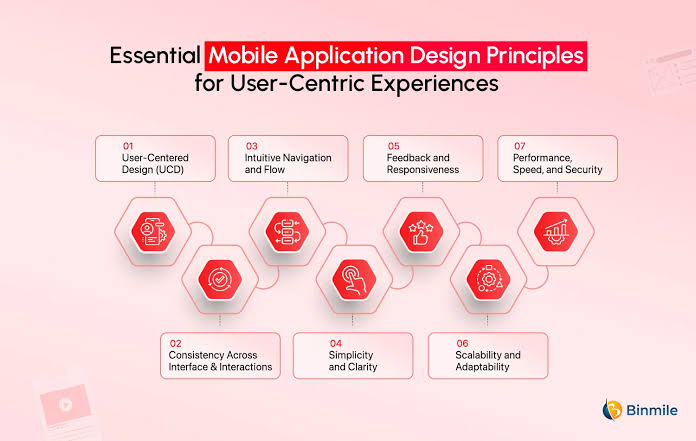
1. Keep the Design Simple
One of the most important rules of application design is simplicity.
A simple design helps users:
- Understand features quickly
- Complete tasks easily
- Avoid mistakes
Designers should remove unnecessary elements and focus on what users actually need.
A clean interface usually creates a better experience than an overloaded interface with too many options.
2. Maintain Consistency
Consistency creates familiarity.
A consistent application uses:
- Similar button styles
- Matching colors
- Same navigation patterns
- Uniform typography
When users understand one part of an application, they can easily understand other sections.
3. Focus on User Needs
Great application design begins with users, not technology.
Designers should ask:
- Who will use this application?
- What problems do users have?
- What goals are they trying to achieve?
Understanding users helps create meaningful solutions.
4. Provide Fast Feedback
Applications should communicate with users.
Examples of feedback include:
- Loading indicators
- Success messages
- Error notifications
- Progress bars
Without feedback, users may think the application is not working.
5. Create Easy Navigation
Navigation determines how users move through an application.
Good navigation should be:
- Clear
- Predictable
- Organized
- Easy to access
Users should never feel lost while using an application.
6. Design for Accessibility
Accessibility ensures that more people can use the application comfortably.
Modern application design considers:
- Different screen abilities
- Color blindness
- Age-related limitations
- Physical accessibility needs
Inclusive design improves the experience for everyone.
Popular Tools Used in Application Design
Professional designers use various tools to plan, create, and test applications.
Figma
Figma is one of the most popular application design tools. It allows designers to create interfaces, prototypes, and collaborate with teams.
Features include:
- Interface design
- Prototyping
- Team collaboration
- Design systems
Adobe XD
Adobe XD is a design and prototyping tool used for creating digital experiences.
It provides features for:
- UI design
- Interactive prototypes
- User testing
- Collaboration
Sketch
Sketch is a popular design platform mainly used for interface design and digital product creation.
It offers:
- Vector editing
- Design libraries
- Plugins
- Collaboration features
InVision
InVision helps designers create interactive prototypes and collect feedback.
It is useful for:
- Testing designs
- Sharing prototypes
- Team communication
Canva
Canva is commonly used for creating visual assets, graphics, and simple design elements.
It helps beginners create:
- Application graphics
- Marketing images
- Presentations
- Visual content
The Role of Artificial Intelligence in Application Design
Artificial Intelligence is changing the way applications are designed and developed.
AI helps designers by:
- Generating design ideas
- Analyzing user behavior
- Improving personalization
- Automating repetitive tasks
- Predicting user needs
Modern applications increasingly use AI-powered features to create smarter experiences.
Examples include:
- Personalized recommendations
- Voice assistants
- Smart search systems
- Automated customer support
Frequently Asked Questions (FAQs) About Application Design
1. What is Application Design?
Application Design is the process of planning, creating, and improving the structure, appearance, and functionality of an application. It focuses on creating applications that are easy to use, visually attractive, and capable of solving users’ problems effectively.
Application design includes user interface design (UI), user experience design (UX), application structure, navigation, features, and overall usability.
2. Why is Application Design important?
Application Design is important because it directly affects how users interact with an application. A well-designed application provides a better user experience, increases customer satisfaction, improves engagement, and helps businesses achieve their goals.
A poor design can make users leave an application, while a simple and effective design encourages users to continue using it.
3. What are the main elements of Application Design?
The main elements of Application Design include:
- User Interface (UI) design
- User Experience (UX) design
- Navigation structure
- Visual design
- Application functionality
- Performance optimization
- Accessibility
- User testing
All these elements work together to create a successful application.
4. What is the difference between UI Design and UX Design?
UI Design focuses on the visual appearance of an application, including colors, buttons, icons, fonts, and layouts.
UX Design focuses on the overall experience users have while using the application, including usability, navigation, and problem-solving.
In simple terms, UI makes an application look good, while UX makes it easy and enjoyable to use.
5. How long does it take to design an application?
The time required for application design depends on the complexity, features, and platform of the application.
A simple application may take a few weeks to design, while a large business application with advanced features may require several months of planning, testing, and improvements.
Conclusion
Application Design plays a vital role in creating successful digital experiences. A well-designed application improves usability, customer satisfaction, and business growth. By focusing on simplicity, functionality, and user needs, businesses can develop applications that are effective, engaging, and valuable. Modern application design continues to evolve with new technologies and user expectations.